

When it comes to excelling in academics, having the right study tools for students can make a huge difference. Gone are the days when studying meant only textbooks and notebooks. Today, students have access to a wide range of tools designed to simplify learning, boost productivity, and improve memory retention. Using the right tools doesn’t just make studying easier—it helps you study smarter, not harder.
In this detailed guide, we’ll explore the best study tools for students, covering everything from digital platforms and apps to traditional methods, with tips on how to use them effectively.
1. Digital Note-Taking Tools
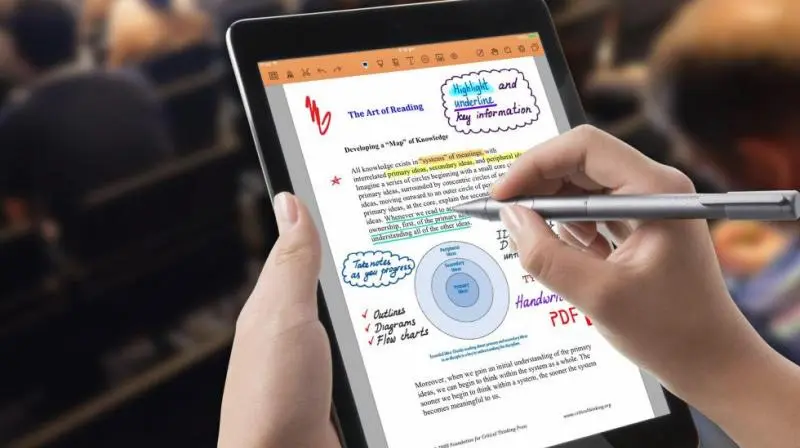
Digital note-taking apps are a lifesaver for students. They help you keep your notes organized, searchable, and accessible from anywhere—perfect for reviewing before exams.
Top Digital Note-Taking Tools:
- Evernote: Lets you organize notes in notebooks, attach files, images, and even voice recordings. You can tag notes for easy searching.
- Notion: Combines note-taking with task management. You can create databases, study schedules, and even track your progress.
- Microsoft OneNote: Ideal for students who like to combine text, diagrams, and hand-drawn notes. OneNote’s flexibility makes it excellent for visual learners.
Tips for Using Digital Notes:
- Keep each subject in separate notebooks or folders.
- Use bullet points and highlights to mark key concepts.
- Sync notes across devices to study on-the-go.
2. Flashcards and Memory Aids
Flashcards are a proven method for active recall, which is one of the most effective learning techniques. They are especially useful for memorizing vocabulary, historical dates, formulas, and key concepts.
Recommended Flashcard Tools:
- Quizlet: Lets you create digital flashcards, play interactive learning games, and test yourself.
- Anki: Uses spaced repetition, ensuring that you review difficult material more frequently.
- Cram: Offers access to thousands of pre-made flashcards on different subjects.
Tips for Flashcards:
- Keep questions and answers short and precise.
- Use images or diagrams whenever possible. Visual cues enhance memory.
- Review daily in short sessions for long-term retention.
3. Time Management and Focus Tools
Effective study is not just about what you study—it’s also about how you study. Time management apps help students stay organized, reduce procrastination, and maximize focus.
Best Tools for Time Management:
- Trello: Create boards for each subject, track homework, and set deadlines.
- Forest App: Helps you stay off your phone by growing a virtual tree while you focus.
- Pomodoro Timers: Tools like Focus Booster break study sessions into 25–30 minute intervals with short breaks in between.
Pro Tip: Combine a to-do list app with the Pomodoro technique. For example, list tasks in Trello, then use the timer to complete each task without distraction.
4. Educational Platforms and Online Resources
Digital learning platforms have transformed education. They provide lectures, tutorials, exercises, and even certifications to enhance knowledge.
Top Platforms for Students:
- Khan Academy: Free lessons in math, science, economics, and more. Excellent for understanding concepts step-by-step.
- Coursera & edX: University-level courses available online, some free, some paid. Ideal for advanced learning or specialized subjects.
- YouTube Educational Channels: Channels like CrashCourse, TED-Ed, and Veritasium make learning engaging and easy to understand.
Tips for Using Online Resources:
- Schedule dedicated time for watching videos or courses to avoid distractions.
- Take notes while watching to reinforce learning.
- Supplement textbooks with online tutorials for better understanding.
5. Mind Mapping and Study Organization Tools
Mind maps are powerful for visual learners. They help you see relationships between concepts, organize ideas, and prepare for exams effectively.
Best Mind Mapping Tools:
- MindMeister: Create colorful and interactive mind maps with branches and subtopics.
- Coggle: Simple and intuitive, great for collaborative mind maps.
- XMind: Powerful software for detailed diagrams, useful for complex subjects like biology or history.
Tips for Mind Mapping:
- Start with the main topic in the center and branch out key ideas.
- Use colors, symbols, and images to make the map memorable.
- Convert mind maps into flashcards or study sheets for revision.
6. Collaboration and Communication Tools

Group study and peer discussions are essential, especially for projects and exam preparation. Collaboration tools make this easy even if students are studying remotely.
Best Collaboration Tools:
- Google Workspace: Docs, Sheets, and Slides for real-time collaboration on assignments and projects.
- Slack or Discord: Great for discussions, sharing files, and staying connected with study groups.
- Padlet: A virtual board where students can post notes, ideas, and questions collaboratively.
Tips for Group Study:
- Set clear goals and deadlines for the group.
- Share summaries instead of duplicating work.
- Discuss challenging topics to gain multiple perspectives.
7. Traditional Study Tools That Still Work
While digital tools are powerful, traditional study tools like notebooks, highlighters, and sticky notes are still incredibly effective. Many students find that physically writing information improves memory retention.
Tips for Using Traditional Tools:
- Highlight key points in textbooks for quick reference.
- Use sticky notes for reminders or important formulas.
- Combine handwritten notes with digital tools for a blended approach.
You may also like to read this:
Top Effective Exam Tips To Ace Your Exams With Confidence
Top Educational Tools For Students in 2026 For Smarter Study
Online Educational Tools: Learn Anytime, Anywhere
Best Educational Tools For Students And Teachers
Best Free Educational Tools To Boost Your Learning Online
Choosing the Right Study Tools for You
Not every tool works for every student. Here’s how to pick the right ones:
- Know your learning style – Visual, auditory, or kinesthetic learners should select tools that complement their style.
- Start simple – Begin with 2–3 essential tools and gradually expand.
- Consistency matters – Regular use is more important than the number of tools.
- Mix old and new methods – Digital tools combined with traditional methods often yield the best results.
Conclusion
In today’s academic environment, study tools for students are more than just helpful—they are essential. From digital note-taking apps and flashcards to time management and mind mapping tools, the right resources can make learning more organized, efficient, and even enjoyable. By experimenting with these tools, finding what fits your style, and using them consistently, you can enhance your learning experience, retain more information, and achieve better academic results.
Remember, studying smart is always better than studying hard. The right tools don’t just help you learn—they help you learn smarter.
FAQs About Study Tools for Students
Q1: Are free study tools effective?
Yes! Many free tools, like Khan Academy, Quizlet, and Notion, offer excellent features suitable for most students.
Q2: Can digital tools replace textbooks?
Not completely. Digital tools complement textbooks by making learning interactive, organized, and accessible anywhere.
Q3: How many study tools should I use at once?
Start with 2–3 essential tools to avoid overwhelm. Gradually add more if needed.
Q4: Are mind maps really effective for exams?
Absolutely! Mind maps help visually organize information, making it easier to remember and recall under exam pressure.
Q5: How do I stay focused while using study apps?
Set timers, block distractions, and take regular breaks. Tools like Forest and Pomodoro timers are great for maintaining focus.